
Run SQL Directly Against Oracle Cloud Fusion. Zero Report Builder Required.
Stop wrestling with Oracle BI Publisher menus, cumbersome data models, and unformatted CSV downloads. Connect securely, write standard SQL with instant autocomplete across 9,439+ Oracle schema objects, and export clean Excel workbooks—engineered with defense-in-depth security.
Hosted SaaS Application at sql.8-sys.com · Free Pilot Release · Multi-user Organization Included
Schema Objects Indexed
Oracle Financials and Supply Chain dictionary with dot-notation column search
SOAP Query Execution
Standard HTTPS SOAP calls straight to ExternalReportWSSService with no template overhead
Postgres Row-Level Security
Row-level security policies on every tenant table, enforced by the database engine
Browser Credential Exposure
Stored passwords are encrypted at rest (AES-based Fernet) and decrypted only in server memory for SOAP requests
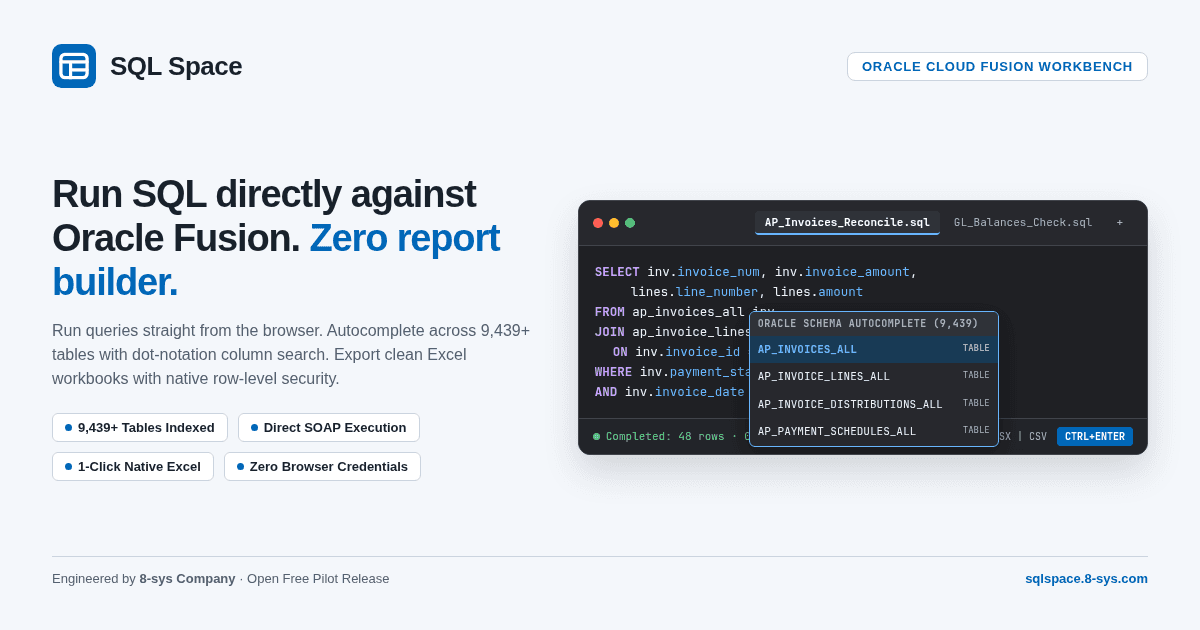
The SQL Space workbench: clean multi-tab SQL editor with live schema autocomplete, syntax highlighting, and responsive completion status.
Explore SQL Space examples
Choose a preset to view sample SQL and results. This demo does not execute queries or measure performance.
| region | currency | total_orders | total_revenue_usd |
|---|---|---|---|
| North America | USD | 22,410 | $7,845,900.00 |
| EMEA | EUR | 14,820 | $4,290,150.00 |
| GCC & Middle East | AED | 9,730 | $3,110,400.00 |
| Asia Pacific | SGD | 8,190 | $2,640,800.00 |
Traditional BI Publisher vs. The SQL Space Experience
Why enterprise analytical teams are switching from complex report builder overhead to direct SQL querying.
Traditional Oracle BI Publisher Flow
- 7+ menu clicks across Navigator, Reports and Analytics, and Catalog menus
- Forced creation of Data Models, LOVs, and RTF templates for simple queries
- Sluggish browser rendering with zero responsive query cancel controls
- Messy CSV downloads requiring manual text-to-columns Excel cleanup
- No multi-tab workspace or cross-session tab restoration
- Credentials frequently shared across analysts in plain text spreadsheets
- Zero query visibility or audit trail across shared Fusion accounts
The SQL Space Flow
- Single clean web tab: type SQL and hit Ctrl+Enter to run
- Direct SOAP execution straight to standard Oracle service—zero templates
- Responsive cancellation (Esc) and live row-count / execution duration lines
- 1-click native Excel (.xlsx) export with numbers, dates, and headers intact
- Persistent multi-tab workspace preserving tabs and history across sessions
- Centralized encrypted connections with role-based member governance
- Insert-only SQL audit log of every query, timestamp, and user IP
Engineered as a Precision Instrument
Built specifically for consultants and analysts who live in SQL. Fast, keyboard-first, and distraction-free.
Quiet, Keyboard-Centric SQL Editor
Everything responds to standard keyboard shortcuts without decorative distractions.
- Multi-tab editing with unsaved change indicators and session restoration
- Scope-aware execution: run all, statement under cursor, or highlighted selection
- Auto-detected parameter prompts for :parameter and :1 placeholders
- Built-in SQL formatter (Ctrl+Shift+F) and calm Light Ocean & Darcula themes
Deep Oracle Schema Intelligence
Instant search across the complete Oracle Cloud Financials and SCM database dictionaries.
- 9,439+ indexed objects (7,149 tables and 2,290 views) ready for autocomplete
- Dot-notation column search (e.g. inv.invoice_num) with alias resolution
- Searchable schema browser with one-click column insertion
- One-click data preview to inspect table structures and sample values
Fast, Sortable & Exportable Results
Handle large enterprise result sets cleanly without freezing your browser tab.
- Virtualized results grid capable of rendering thousands of rows smoothly
- 1-click native Excel (.xlsx) download preserving numbers, dates, and text formats
- CSV and JSON export formats for downstream data integration
- Bilingual data rendering with cell-level right-to-left support for Arabic data
Organization & Team Governance
Bring order to shared queries, credentials, and institutional SQL knowledge.
- Multi-tenant organizations with Owner, Admin, and Member roles
- Shared connection profiles: analysts query without seeing raw passwords
- Centralized query history and shared saved query folders
- Insert-only query audit log of every execution for enterprise compliance
How SQL Space Works
A non-intrusive integration pattern that requires zero changes to your Oracle Fusion environment.
1. Write Standard SQL
Analyst writes a query in the SQL Space browser tab with intelligent schema autocomplete.
2. Secure SOAP Transport
SQL Space server encodes the query and dispatches an HTTPS SOAP call to Oracle's ExternalReportWSSService using encrypted credentials.
3. Fusion Execution
Oracle Cloud Fusion processes the query and returns the raw tabular data stream securely over TLS.
4. Streamed Presentation
SQL Space parses the response into a high-performance virtualized grid with 1-click Excel export.
Enterprise Security & Architecture
Built from the ground up to satisfy CISOs, security architects, and enterprise compliance officers.
Query Results Not Stored
Query results are delivered to your browser and are not saved in the database. The only server-side copy is a temporary buffer used to assemble Excel exports, removed once the download completes.
Postgres 16 Row-Level Security
Tenant data isolation is enforced at the database engine level via strict Row-Level Security policies on every table.
Encrypted Credentials at Rest
Stored connection passwords are encrypted at rest with AES-based Fernet. Passwords are decrypted only in memory during SOAP calls and never returned to the browser.
SSRF Protection & Pinning
Outbound requests enforce HTTPS port 443 with allowlisted Oracle domains (*.oraclecloud.com) and DNS rebind socket protection.
Two-Step Login for Admins
TOTP authenticator MFA with HMAC-hashed backup recovery codes and strict session invalidation upon security events.
Append-Only SQL Audit Log
Every executed query is recorded in an insert-only audit log with user email, timestamp, IP address, SQL text, and row count, retained for one year by default.
Technical & Architectural FAQs
Does SQL Space require modifying our Oracle Fusion instance or installing plugins?
No. SQL Space communicates with Oracle Cloud Fusion exclusively through Oracle's standard BI Publisher SOAP web service (ExternalReportWSSService). No plugins, custom code, or administrative modifications to your Oracle tenancy are required.
Can users modify or delete data in Oracle Cloud Fusion through SQL Space?
SQL Space submits read-only SELECT queries through Oracle BI Publisher, and results are limited by the data-security roles of the Oracle user whose credentials you provide. We recommend connecting with a dedicated read-only reporting user.
How are Oracle connection credentials stored and protected?
Connection passwords are encrypted at rest using Fernet, an AES-based authenticated encryption scheme. Passwords are decrypted only in ephemeral server memory for the duration of the SOAP request, and are never sent back to the browser.
How do we get started with SQL Space?
Visit sql.8-sys.com to create an organization account. Once signed up, configure your Oracle Fusion host connection profile and start querying immediately in your browser.
Ready to Accelerate Your Oracle Fusion Analysis?
Access the live application at sql.8-sys.com to launch your workspace, or contact our enterprise team to discuss custom integrations.

Universal Operational Dashboards with Native Oracle Fusion Cloud Integration.
Connect SQLite, MySQL/MariaDB, PostgreSQL, Oracle Database, Microsoft SQL Server, or Oracle Fusion Cloud BI Publisher. Build interactive KPI canvases, model semantic datasets without SQL, and automate report distribution across the enterprise.
Hosted at fusion.8-sys.com · Sign in with your company account
Relational Database Support
SQLite, MySQL/MariaDB, PostgreSQL, Oracle Database, and Microsoft SQL Server with dialect-aware querying
Oracle Fusion BIP Ingestion
Chunked XML data sync and async submit/poll/download modes to prevent gateway timeouts
Visual Semantic Layer
Join cross-source tables, define dimensions, and calculate measures with zero SQL requirement
Scheduled Distribution
Automated PDF and native Excel (XLSX) exports delivered by email to FusionFlow users and via SFTP and Webhooks to external systems
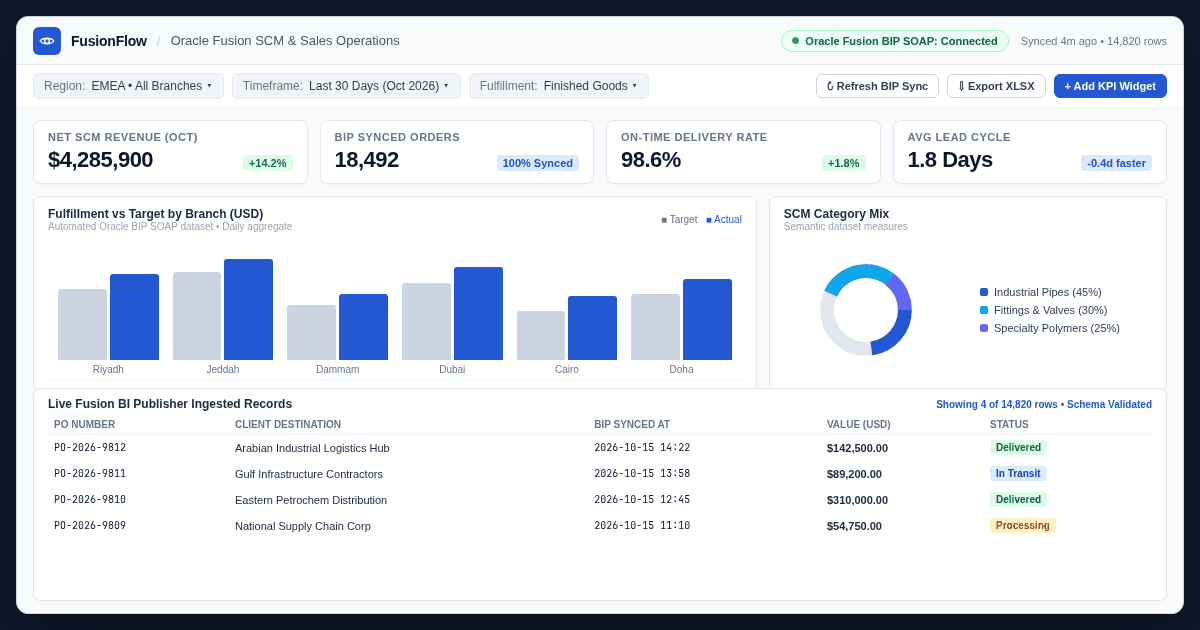
The FusionFlow operational canvas: live KPI metrics, automated Oracle Fusion BIP sync status, multi-dimensional charts, and drillable data tables.
Traditional Spreadsheets vs. The FusionFlow Experience
Why operational teams replace disconnected desktop workbooks with automated, role-governed web dashboards.
Traditional Spreadsheets & Silos
- Manual CSV exports from ERPs leading to stale data within hours
- Fragile VLOOKUPs and custom macros that break when source schemas change
- Unmanaged distribution via email attachments with zero access control
- Inconsistent metric definitions across departments and regional teams
- No proactive alerting when key performance indicators breach thresholds
- Laggy performance when rendering tens of thousands of transaction records
- Sensitive business metrics scattered across unencrypted local machines
The FusionFlow Operating Flow
- Automated scheduled ingestion directly from databases and Oracle BIP SOAP
- Centralized semantic modeling preserving calculations and join rules
- Admin and Viewer roles with per-dashboard access control
- Single source of truth with standardized dimensions and calculated measures
- Proactive threshold alerts delivered to FusionFlow users by email and to external systems via webhooks
- High-performance virtualized canvas with responsive charts and filters
- Credentials encrypted at rest with Fernet and secure HTTPS transmission
Engineered for Enterprise Operational Intelligence
From raw database transactions to executive dashboards in minutes, with full enterprise security and governance.
Universal Relational & Oracle BIP Ingestion
Ingest operational data seamlessly from diverse databases and cloud enterprise platforms.
- Dialect-aware connectors for SQLite, MySQL/MariaDB, PostgreSQL, Oracle Database, and Microsoft SQL Server
- Native Oracle Fusion Cloud BI Publisher integration via ExternalReportWSSService
- Intelligent chunking and async polling preventing large-payload gateway timeouts
- Automated sync schedules (hourly, daily, custom cron) with retry resilience
Drag-and-Drop Operational Canvas
Compose rich, responsive dashboards with visual widgets and interactive filters.
- Versatile widget library: KPI stat cards, multi-series bars, trend lines, and donuts
- Interactive parameter filters for branch, timeframe, and category slicing
- Flexible grid layout with drag-and-drop card repositioning and resizing
- Native RTL layout support with IBM Plex Sans Arabic typography for Arabic business leaders
Semantic Layer & Visual Modeling
Empower analysts to construct governed data models without writing complex SQL.
- Visual dataset designer to link tables, create relationships, and map keys
- Formula builder for calculated fields, aggregates, and period-over-period growth
- Custom SQL escape hatch allowing data teams to write complex custom queries
- Data type validation ensuring clean formatting of currencies, dates, and percentages
Governance, Alerts & Scheduled Export
Distribute operational insight securely while maintaining complete data governance.
- Admin and Viewer roles with per-dashboard access control
- Scheduled automated exports delivering formatted PDF and native Excel (.xlsx) workbooks
- Multi-channel delivery: email to FusionFlow users, plus secure SFTP and custom Webhooks to external systems
- KPI threshold monitoring with exception alerts delivered to operational teams
How FusionFlow Ingests and Delivers Insight
An end-to-end operational pipeline connecting source databases to executive decision makers.
1. Connect Data Sources
Configure secure connections to any relational database or Oracle Fusion Cloud BI Publisher endpoint.
2. Automated Ingestion & Sync
The sync engine pulls transactional streams using chunked SOAP calls or direct queries on configured schedules.
3. Semantic Transformation
Datasets are shaped through visual joins, calculated dimensions, and reusable operational measures.
4. Interactive Delivery & Alerts
Stakeholders view live interactive web dashboards or receive scheduled PDF/XLSX digests and threshold alerts.
Enterprise-Grade Security & Isolation
Engineered to safeguard corporate metrics and transactional connections at every tier.
Fernet Credential Encryption
Database connection strings, SOAP service passwords, and API tokens are encrypted at rest using AES-based Fernet authenticated cryptography.
Granular Multi-Role RBAC
Admin and Viewer roles with per-dashboard access ensure users only access assigned dashboards and sensitive datasets.
SSRF & Host Protection
Strict outbound request validation guards against Server-Side Request Forgery with allowlisted hosts and secure TLS enforcement.
CSRF & Mutation Defense
All state-changing operations require signed CSRF tokens and secure HTTP-only cookies to eliminate cross-site tampering.
Resilient Job Scheduling
Background synchronization tasks feature automatic retries, backoff mechanisms, and execution logs for complete operational auditability.
Native Excel & Vector PDF Engine
Exports generate authentic typed XLSX workbooks and print-ready vector PDFs, preserving number formatting, dates, and column layouts.
FusionFlow Technical & Deployment FAQs
Which relational databases can FusionFlow connect to?
FusionFlow supports SQLite, MySQL/MariaDB, PostgreSQL, Oracle Database, and Microsoft SQL Server, alongside specialized automated integration for Oracle Fusion Cloud BI Publisher.
How does FusionFlow handle large Oracle Fusion BI Publisher extracts without timeouts?
FusionFlow employs chunked ingestion and asynchronous submit/poll/download modes against Oracle BI Publisher SOAP services (ExternalReportWSSService). This avoids HTTP gateway 504 timeouts on heavy transactional datasets.
Do dashboard viewers need database credentials to see data?
No. Database and Oracle Fusion credentials are encrypted and managed centrally by Administrators. Viewers access compiled dashboard views through role-governed sessions without any visibility into underlying credentials.
Can dashboards be exported and delivered automatically?
Yes. FusionFlow includes an automated distribution engine that delivers scheduled PDF summaries and native Excel (.xlsx) workbooks on daily, weekly, or monthly cadences. Email goes to FusionFlow user accounts only; SFTP and Webhooks deliver to external systems.
Ready to Transform Your Operational Reporting?
Access the live application at fusion.8-sys.com to start building operational dashboards, or speak with our solutions team for custom deployment guidance.